Auto Clips for Streams & Twitch: Turn Your Stream into 5 Viral TikToks in 3 Minutes
Stop spending 4 hours editing by hand or paying $500/month to an agency. AutoClip Streamer analyzes your Twitch, Kick, and OBS streams locally on your PC, extracts your funniest moments and clutch plays in 9:16, burns high-retention animated subtitles, and exports in Full HD. 100% private, no minute caps, and zero cloud wait times.
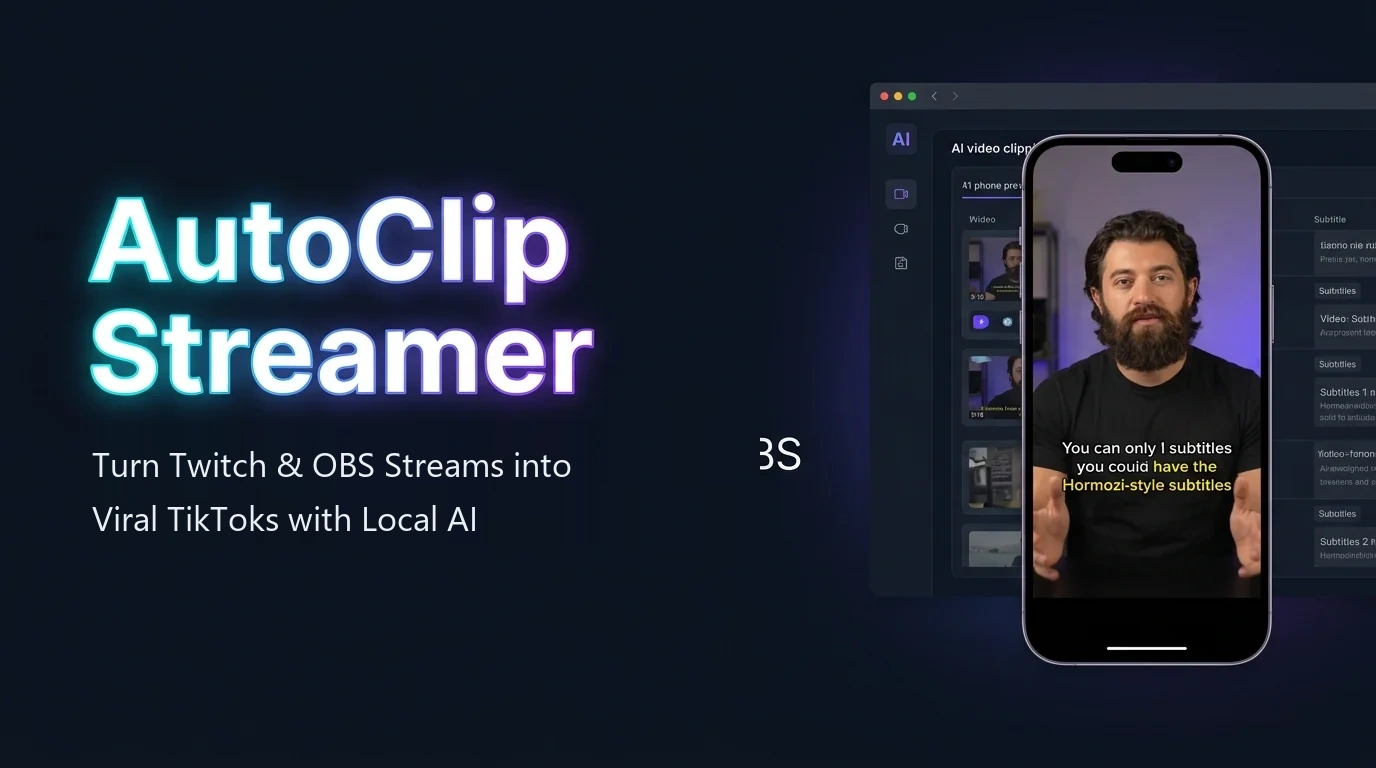
Are you a small streamer who can't afford $500/month for a video editor?
On Twitch and Kick, nobody discovers you by accident. The only proven way to grow in 2026 is publishing your best moments every single day on TikTok, YouTube Shorts, and Instagram Reels.
The Harsh Reality of Live Streaming
Streaming 6 hours a day for 3 or 5 viewers will never make you grow if you are buried at the bottom of the directory on Twitch, Kick, or YouTube Live. These platforms lack passive organic discovery for new channels: nobody scrolls down 2,000 channels to find you.
The Vertical Video Growth Funnel
The algorithm on TikTok and Shorts serves your content to thousands of fresh viewers based strictly on watch time and retention. A single 30-second clip of an insane clutch or funny reaction can reach tens of thousands of potential followers and funnel them straight into your live stream.
Your 24/7 Local AI Video Editor
Freelance video editors charge between $300 and $800 every month. AutoClip scans your entire stream in 3 minutes locally on your PC, extracts peak moments in 9:16 vertical format, and generates kinetic subtitles with zero recurring agency overhead.
From Live Stream to Viral TikToks in 3 Minutes
A completely automated workflow running 100% locally on your computer—no video editing experience required.
Record or Drop Your VOD
Save your stream directly in OBS Studio or download the broadcast replay from Twitch, Kick, or YouTube.
1-Click AI Analysis
The local AI scans audio decibels, laughter, screams, and clutch moments, scoring every highlight automatically.
Preview & Customize
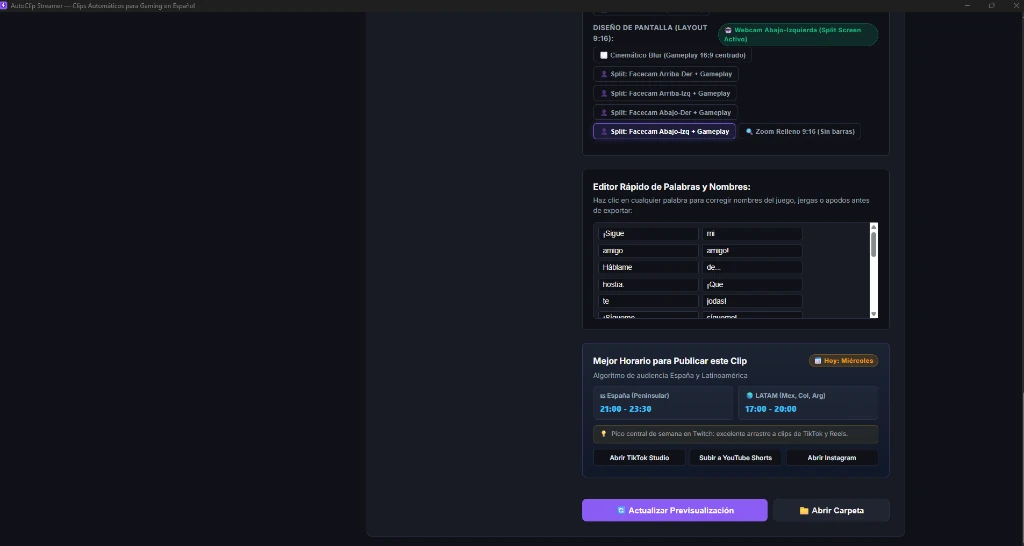
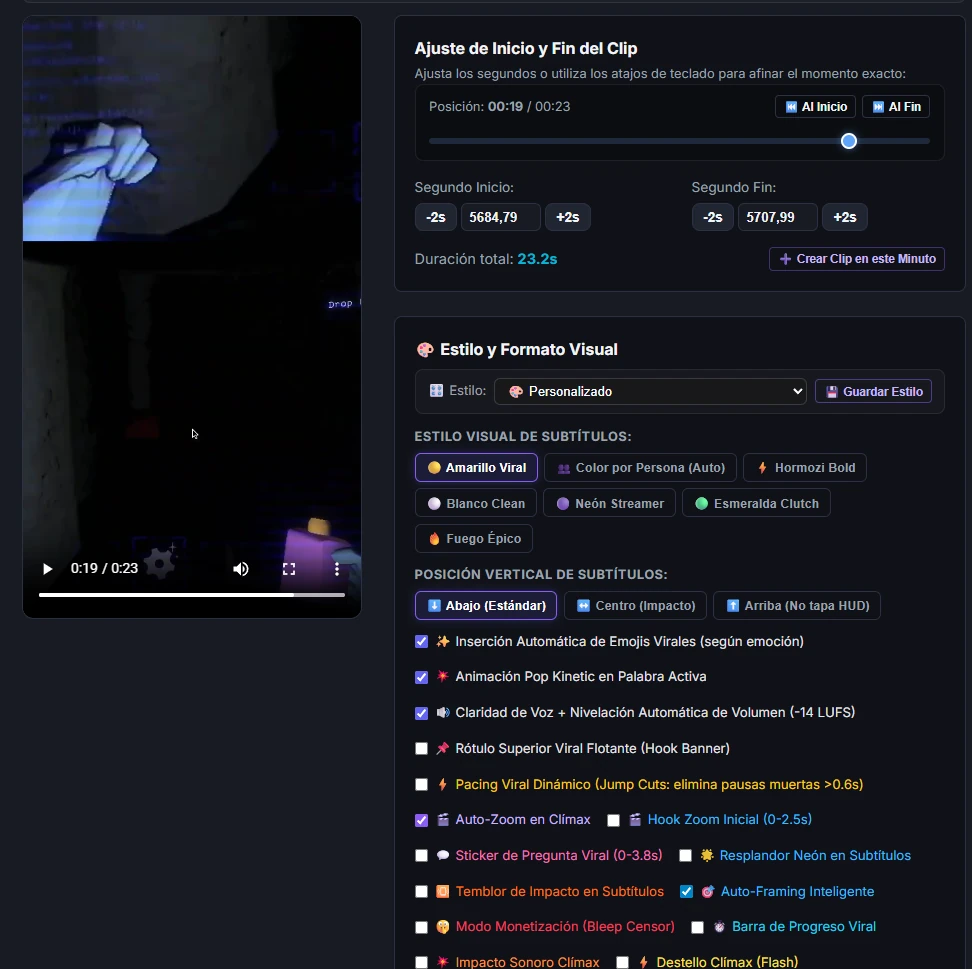
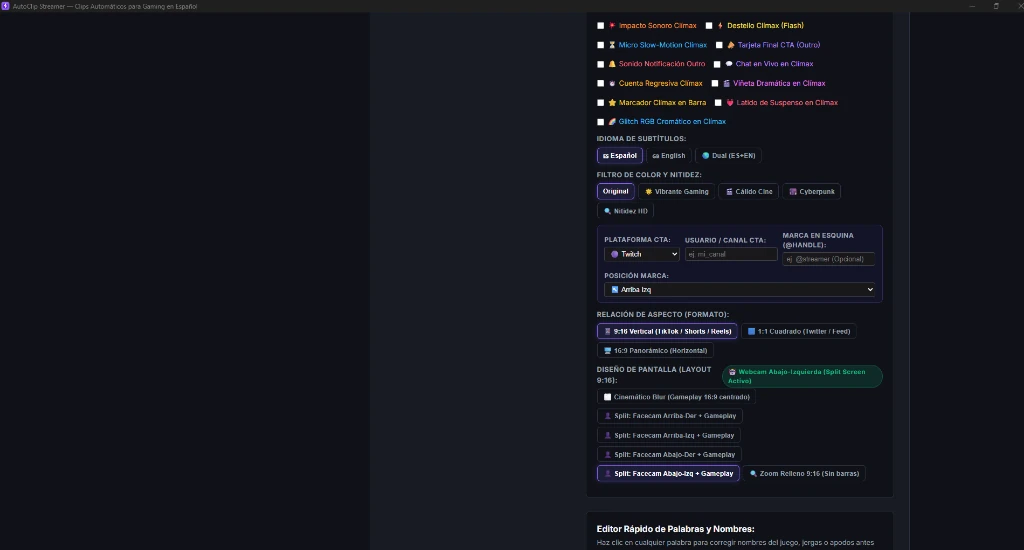
Check the 9:16 vertical framing with cinematic blur or split webcam, and style kinetic subtitles with emojis.
Export & Publish
Export in pristine 1080x1920 HD alongside ready-to-paste text files containing viral hooks, titles, and hashtags.
AutoClip Streamer vs. Opus Clip, Klap, & Eklipse
Discover why AutoClip is the superior local alternative to expensive cloud subscriptions like Opus Clip and Klap. Process directly on your PC with zero limits and 100% privacy.
| Key Feature | ⚡ AutoClip Streamer | ☁️ Opus Clip | ☁️ Klap.app | ☁️ Eklipse.gg |
|---|---|---|---|---|
| Processing & Privacy | ✅ 100% Local on your PC (Never uploaded) | ☁️ Third-party US cloud servers | ☁️ Third-party cloud servers | ☁️ Third-party cloud servers |
| Pricing Model | ✅ $0 Free / $1.99 Trial / $49 Lifetime | ❌ $19 – $29 / month (Recurring) | ❌ $29 – $49 / month | ❌ $19 – $49 / month |
| Video Minute Caps | ✅ Unlimited (Zero cost per minute) | ❌ 150 – 300 min/mo credit limits | ❌ Monthly credit caps | ❌ 60 – 200 min/mo |
| Upload Queue Wait Time | ✅ 0 minutes (Reads directly from SSD) | ❌ 15 – 35 min upload & queue | ❌ 20 – 40 min upload & queue | ❌ 30 – 60 min cloud wait |
| GPU Hardware Acceleration | ✅ NVIDIA NVENC / CUDA & AMD AMF | ❌ Server queue dependent | ❌ Server queue dependent | ❌ Server queue dependent |
| Supported Video Formats | ✅ 9:16 Vertical + 16:9 with YouTube Chapters | ⚠️ Only 9:16 vertical | ⚠️ Only 9:16 vertical | ⚠️ Only 9:16 vertical |
| Source Video Compatibility | ✅ OBS recordings, Twitch, Kick, YouTube | ⚠️ YouTube & cloud links only | ⚠️ YouTube links mainly | ⚠️ Twitch, Kick & YouTube |
| Mobile Transfer (QR Wi-Fi Sync) | ✅ 1-Tap to Camera Roll (iOS & Android) | ❌ Must download from web dashboard | ❌ Must download from web dashboard | ❌ Heavy mobile app & login needed |
| Viral Pacing (Silence Removal) | ✅ Jump cuts with aligned subtitles | ⚠️ Basic in high tiers | ❌ No automatic silence trimmer | ⚠️ Basic in paid plans |
| Direct Link Import (VOD / Clip) | ✅ Twitch, Kick & YouTube without limits | ⚠️ Consumes expensive credits | ⚠️ Consumes expensive credits | ⚠️ Slow server downloading |
| OBS Auto-Pilot (Watch Folder) | ✅ Auto-detects and clips right after stream | ❌ Not available for OBS | ❌ Manual upload required | ❌ Manual upload required |
| Climax Auto-Zoom & Custom Presets | ✅ Punch-in zoom on peaks + 1-click presets | ❌ Fixed templates without zoom | ❌ Fixed templates without zoom | ❌ Generic templates |
❌ Traditional Cloud Platforms (Opus Clip / Klap / Eklipse)
- Take 30 to 45 minutes just uploading a 4-hour broadcast to external servers.
- Lock you into $20 to $40 monthly subscriptions that drain your wallet.
- Impose strict minute caps (150-300 min/mo) and charge extra for credits.
- Your unreleased footage and personal voice recordings sit on third-party servers.
- Re-exporting or editing subtitle timing requires waiting through cloud queues again.
⚡ AutoClip Streamer (100% Local on Your PC)
- Zero upload wait times: Reads instantly from your local SSD or NVMe drive.
- First month PRO trial for just $1.99 (or Lifetime Pass for $49.90 forever).
- Hardware accelerated: Blazing fast exports with NVIDIA NVENC, CUDA & AMD AMF.
- 100% Private and Secure: All AI processing runs completely offline on your PC.
- Unlimited exports: Clip 20 hours a week without paying a single cent in credit fees.
Everything You Need to Dominate TikTok, Shorts & Reels
Engineered specifically for Twitch, Kick, and YouTube gaming streamers.
Context-Aware Local AI
Describe your stream topic (e.g. "horror gameplay with jumpscares and funny screams") and the AI prioritizes climax moments and drafts viral hooks.
Smart Acoustic Energy Detection
Combines raw decibel energy curves with an intelligent lexical detector to pinpoint the exact climax of jokes, clutch kills, and victory celebrations.
Pixel-Perfect 9:16 Symmetrical Framing
Centers 16:9 gameplay mathematically at y=656 with smooth cinematic background blur, leaving balanced safe space for subtitles and facecams.
Dynamic Word-by-Word Subtitles
Generates native kinetic subtitles with synchronized word-level highlighting (Viral Yellow, Hormozi, and Neon styles). Edit any word with 1 click before exporting.
Context Padding Engine
Automatically prepends 5 to 15 seconds before the climax so viewers understand the setup and context of the play, not just the punchline.
Continuous Updates & Slang Models
Enjoy regular updates: new game presets (Valorant, Fortnite, GTA RP), upgraded AI transcription models, and fresh trending subtitle animations.
Mobile Transfer via QR (Wi-Fi Sync)
Scan the on-screen QR code with your iPhone or Android camera to save rendered clips directly to your camera roll over local Wi-Fi in 1 second. Zero cables, zero cloud drives.
Viral Pacing Jump Cuts (Silence Trimmer)
Detects and cuts dead air pauses over 0.75s between sentences. Skyrockets viewer retention on TikTok and Shorts while keeping subtitles in perfect sync.
Direct Link VOD & Clip Import
Paste any public Twitch clip, VOD broadcast, or YouTube link. AutoClip streams and processes footage directly to your PC without shady download websites.
OBS Auto-Pilot Watch Folder
Monitors your OBS recording directory in the background. The moment you hit 'Stop Recording', AutoClip detects the completed file and starts generating clips automatically.
Climax Auto-Zoom & Creator Presets
Applies an algorithmic 1.15x punch-in zoom during the exact climax second of every highlight. Save your favorite subtitle styles, colors, and layouts as 1-click presets.
System Requirements (Minimum vs. Recommended)
Check your PC readiness. AutoClip runs smoothly on Intel and AMD Ryzen CPUs, with hardware acceleration for NVIDIA (CUDA/NVENC) and AMD Radeon (AMF).
| Component | Minimum Requirements (CPU Mode) | Recommended Requirements (GPU Accelerated) |
|---|---|---|
| Operating System | Windows 10 / 11 (64-bit) | Windows 10 / 11 (64-bit) |
| Processor (CPU) | Intel Core i5 (8th gen+) / AMD Ryzen 5 | Intel Core i7 / AMD Ryzen 7 or higher |
| Memory (RAM) | 8 GB RAM | 16 GB RAM or higher |
| Graphics Card (GPU) | Standard integrated graphics | Dedicated GPU (NVIDIA RTX/GTX or AMD Radeon RX) |
| Storage | 5 GB free disk space | 15 GB free on SSD / NVMe |
| Analysis Time (1h Stream) | ~5 to 12 minutes (CPU) | ~1 to 3 minutes (With GPU acceleration) |
Transparent Pricing Built for Streamers
Start 100% free or unlock unlimited PRO power with our limited-time launch offer.
Everything you need to publish daily clips and explode your channel
You are not just buying software: you get a full automated growth engine engineered to dominate the vertical video algorithm without becoming a slave to editing.
Unlimited stream analysis, GPU-accelerated 9:16 vertical render, dynamic subtitles, and ZERO watermarks.
Tested high-retention video structures, psychological curiosity hooks, and optimal posting timeframes.
1-click multi-track audio routing and optimal bitrate presets for instant lossless clipping.
Custom vocabulary for Valorant, GTA RP, Fortnite, and LoL for clean, typo-free gaming subtitles.
Test it on your own streams. If it doesn't save you at least 10 hours of manual editing a month, 100% full refund with zero questions asked.
Free Plan
Test the software and start publishing with zero cost
- ✅ Unlimited stream analysis on your PC
- ✅ Real-time 9:16 vertical preview
- ✅ Dynamic subtitles with viral emojis
- ✅ Viral Pacing (automatic silence & dead time removal)
- ✅ Instant Mobile Transfer via QR (Wi-Fi Sync)
- ⚠️ Subtle promotional watermark on exported clips
- ❌ 1-click batch export (Top 5 / All)
- ❌ 16:9 YouTube Supercut compilation
Creator PRO Plan
For streamers publishing daily on TikTok & Shorts
- ⚡ Unlimited Full HD Exports: CERO Watermarks
- 🎙️ Studio-Quality Whisper Models (up to large-v3)
- 🎨 All Subtitle Styles (Viral Yellow, Emerald, Pop...)
- 📦 1-Click Batch Export (Top 5 clips ready)
- 🎬 16:9 YouTube Supercut with chapter markers
- 📝 Metadata in .txt with high-retention titles and hooks
- 🎁 All Value Stack Bonuses Included
- ⭐ Priority Creator Support
Lifetime Pass
One-time payment. Zero recurring monthly fees.
- ✅ Everything included in Creator PRO
- ✅ Perpetual license for your PC (free transfer if you upgrade)
- ✅ 100% Offline usage without internet connection
- ✅ 1 year of major version updates included
- 🎁 All Value Stack Bonuses Included
- 🔒 14-day unconditional money-back guarantee
Free Version vs. Creator PRO
Compare every feature and unlock the full potential of your streaming channel.
| Feature / Capability | Free Plan ($0) | ⭐ Creator PRO ($1.99) | Lifetime Pass ($49.90) |
|---|---|---|---|
| Watermarks on Clips | ⚠ Subtle watermark | ✓ ZERO watermarks (100% Clean) | ✓ ZERO watermarks (100% Clean) |
| Stream Analysis Minutes | ✓ Unlimited (Local on PC) | ✓ Unlimited (Local on PC) | ✓ Unlimited (Local on PC) |
| Interactive 9:16 Preview | ✓ Yes (Real-time) | ✓ Yes (Real-time) | ✓ Yes (Real-time) |
| Kinetic Word-by-Word Subtitles | ✓ Yes (Highlighted) | ✓ Yes (Highlighted) | ✓ Yes (Highlighted) |
| Subtitle Styles (Viral Yellow, Emerald Green, Pop Kinetic...) | ⚠ Base style | ✓ All Styles Unlocked | ✓ All Styles Unlocked |
| Contextual AI Emojis | ✓ Yes (🔥, 😂, 😱, 💀) | ✓ Yes (🔥, 😂, 😱, 💀) | ✓ Yes (🔥, 😂, 😱, 💀) |
| 1-Click Batch Export (Top 5 / All) | ✗ 1 by 1 export | ✓ Top 5 & Full Batch | ✓ Top 5 & Full Batch |
| 16:9 YouTube Supercut Compilation | ✗ Not available | ✓ Yes (Widescreen HD) | ✓ Yes (Widescreen HD) |
| YouTube Timestamps & Chapters | ✗ Not available | ✓ Automatic Calculation | ✓ Automatic Calculation |
| Export Kit (.txt titles, hooks & tags) | ✗ Not available | ✓ Saved Automatically | ✓ Saved Automatically |
| Mobile Transfer via QR (Wi-Fi Sync) | ✓ Yes (To camera roll in 1s) | ✓ Direct to camera roll in 1s | ✓ Direct to camera roll in 1s |
| Viral Pacing (Silence Removal) | ✓ Yes (Jump cuts) | ✓ Jump cuts with aligned subtitles | ✓ Jump cuts with aligned subtitles |
| GPU Acceleration (NVENC / AMF) | ✓ Yes | ✓ Maximum GPU Performance | ✓ Maximum GPU Performance |
| Updates & Creator Support | ✓ Community | ✓ Priority VIP Support | ✓ Lifetime Access |
| License Type | Permanent Free | $1.99 first month (then $9.99/mo) | $49.90 one-time payment |
Earn 40% Recurring Commission Recommending AutoClip Streamer
Are you a streamer, content creator, video editor, or gaming community leader? Recommend AutoClip Streamer and generate passive income every single week.
40% Direct Commission
The highest commission rate in the creator tools industry. Earn a clean 40% on every single license or recurring subscription bought through your link.
30-Day Attribution Cookie
If a fellow creator clicks your link today but decides to purchase within the next 30 days, the commission is 100% credited to your account.
Automatic Weekly Payouts
Managed directly by Gumroad. Get paid automatically every Friday into your PayPal or bank account without filing manual invoices.
How to Start Earning in 3 Simple Steps
Join on Gumroad
Sign up to our affiliate program via Gumroad or email us at info@autoclipstreamer.com and we'll approve your invite within minutes.
Share Your Exclusive Link
Add your link to your Twitch chat bot command (!clips), your Twitter/TikTok bio, or share it in your Discord creator circle.
Collect Your Earnings
Gumroad tracks every visit and conversion in real time. Receive your commission payouts weekly on complete auto-pilot.
Do you run a large YouTube channel or creator community? Contact us for custom sponsorship packages and co-branded discount codes.