The #1 Opus Clip Alternative
100% Local on Your GPU for PC
Tired of paying $19 to $38/month for expiring cloud credits and waiting 45 minutes for VODs to upload? AutoClip Streamer runs directly on your Windows PC using dedicated NVIDIA NVENC hardware acceleration, with unlimited video minutes, native OBS multi-track audio, and zero cloud wait times.
Why Creators Choose AutoClip Over Opus Clip & Klap
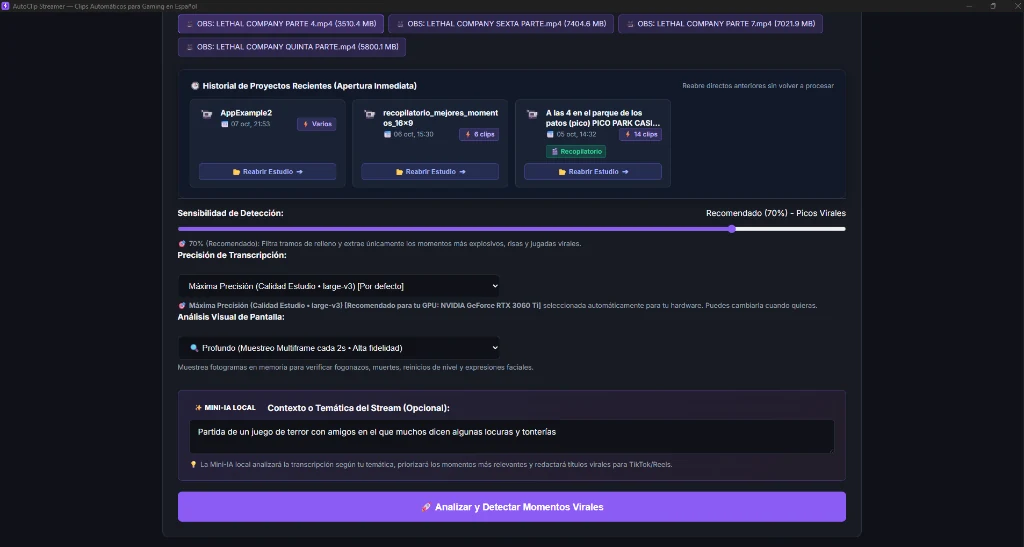
1. Zero Cloud Upload Queues (0-Second Wait)
With cloud SaaS platforms (Opus Clip, Klap), you must upload 10 GB to 20 GB raw stream files over your home internet and wait in shared server queues. With AutoClip Streamer, select the file from your local SSD and highlight analysis starts instantly.
2. $1.99 Trial & $49.90 Lifetime vs $29/mo (Save 85%+)
Opus Clip locks you into recurring subscriptions of $228 to $456 every single year for limited minutes. AutoClip Streamer offers a forever-free plan, a $1.99 trial month, and a one-time $49.90 Lifetime License with zero ongoing fees.
3. Engineered for Gaming & High-Energy Streams
Cloud tools were designed for calm boardroom interviews and corporate podcasts. They struggle with screams, hysterical laughter, rapid gaming reactions, and clutch gameplay. AutoClip’s acoustic engine detects true viral stream climaxes.
4. 1-Click 16:9 YouTube Supercut with Chapters
Opus Clip only generates isolated vertical shorts. AutoClip Streamer produces both 9:16 vertical clips for TikTok/Shorts and stitches top highlights into a full horizontal 16:9 recap video with ready-to-paste YouTube chapters (00:00, 01:15...).
5. Multi-Track OBS Studio Audio Mixing
If you record in OBS with separated audio tracks (Track 1 Game + Track 2 Mic + Track 3 Discord), cloud platforms frequently mute your commentary. AutoClip automatically detects and blends all audio channels cleanly.
6. Absolute Privacy on Your PC
Your raw video files, voice, and webcam footage never leave your computer. Everything processes locally on your own GPU with complete security and zero third-party cloud data harvesting.
AutoClip Streamer vs Opus Clip vs Klap
| Feature | ⚡ AutoClip Streamer (Local) | Opus Clip (Cloud) | Klap.app (Cloud) |
|---|---|---|---|
| Architecture | ✔ 100% On-Device PC (NVIDIA / CPU) | ✘ Remote Cloud Servers | ✘ Remote Cloud Servers |
| VOD Upload Wait Time | ✔ 0 seconds (Direct from local SSD) | ✘ 30 - 60 minutes | ✘ 30 - 60 minutes |
| Monthly Cost | ✔ Free / $1.99 Trial / $49.90 Lifetime | ✘ $19 - $38 / month | ✘ $29 - $79 / month |
| Video Length Limit | ✔ Unlimited (4h+ streams) | ✘ Strict monthly minute caps | ✘ Strict credit limits |
| Multi-Track OBS Audio | ✔ Auto-detects & mixes all tracks | ✘ Track 1 only (often muted) | ✘ Track 1 only |
| Kinetic Pop Subtitles + Emojis | ✔ Word-by-word with auto-emojis | ✔ Yes | ✔ Yes |
| 16:9 YouTube Supercut with Chapters | ✔ Included (Shorts + YouTube horizontal) | ✘ Vertical clips only | ✘ Vertical clips only |
| Data Privacy | ✔ 100% on your machine | ✘ Sent to third-party servers | ✘ Sent to third-party servers |
Frequently Asked Questions
Why is AutoClip Streamer the best alternative to Opus Clip for streamers?
Opus Clip was designed for quiet conversational podcasts in English and charges recurring subscriptions for limited cloud minutes. AutoClip Streamer runs 100% locally on your Windows PC using your NVIDIA GPU, processes 4-hour Twitch or OBS streams in 0 seconds with zero cloud upload wait times, understands gaming hype and laughter, and offers unlimited video analysis without expiring monthly credits.
Does AutoClip Streamer have monthly minute caps like Opus Clip?
No. Because processing is executed entirely on your local computer using hardware acceleration (NVIDIA NVENC, AMD AMF, Intel QuickSync, or multi-core CPU), you can analyze as many hours of video as you want without worrying about monthly credits running out.
Do I need to upload huge 15 GB VOD files to cloud servers?
No. With cloud tools like Opus Clip or Klap, uploading a 4-hour broadcast can take 30 to 60 minutes. With AutoClip Streamer, you simply select the local file from your SSD or hard drive and analysis starts instantly with 0 seconds of upload wait time and complete privacy.
How does AutoClip Streamer handle multi-track audio recorded in OBS Studio?
Most cloud platforms only process audio track 1, resulting in muted clips if your microphone and game sound are separated. AutoClip automatically detects, isolates, and mixes multi-track OBS recordings so your voice commentary is always perfectly balanced.
Try the Local Alternative and Stop Paying Monthly Fees
Download AutoClip Streamer free on your Windows PC and experience instant GPU clipping with zero cloud wait times.